Effective Tips for Organizing Your Home Workspace to Boost Productivity and Comfort
Creating an organized and comfortable home workspace is essential for staying focused and productive throughout the day. Whether you work remotely full-time or occasionally, having a dedicated area that supports your workflow can make a significant difference in your efficiency and well-being. In this post, we’ll explore effective tips for setting up and maintaining a home workspace that boosts both productivity and comfort.
Why Organizing Your Home Workspace Matters
A cluttered or poorly arranged workspace can lead to distractions, increased stress, and reduced effectiveness. On the other hand, a thoughtfully organized space helps minimize interruptions, keeps necessary tools within reach, and creates an inviting environment that encourages sustained focus.
Step 1: Choose the Right Location
Select a Quiet, Well-Lit Spot
Identify a place in your home that offers minimal distractions and good natural light if possible. Natural light boosts mood and reduces eye strain. If natural light is limited, invest in quality task lighting that illuminates your desk without causing glare.
Consider Privacy and Noise Levels
If you live with others, try to pick a spot away from high-traffic areas. Noise-cancelling headphones can also help if sound distractions are unavoidable.
Step 2: Invest in Comfortable, Functional Furniture
Ergonomic Chair
An adjustable chair with good back support keeps you comfortable during long working hours and reduces the risk of posture-related discomfort.
Suitable Desk
Choose a desk that fits your space and provides enough surface area for your computer, paperwork, and any other materials you need regularly.
Optional: Standing Desk or Adjustable Workstation
If you prefer to alternate between sitting and standing, consider a height-adjustable desk. This can improve circulation and reduce fatigue.
Step 3: Declutter and Organize
Keep Essentials Within Reach
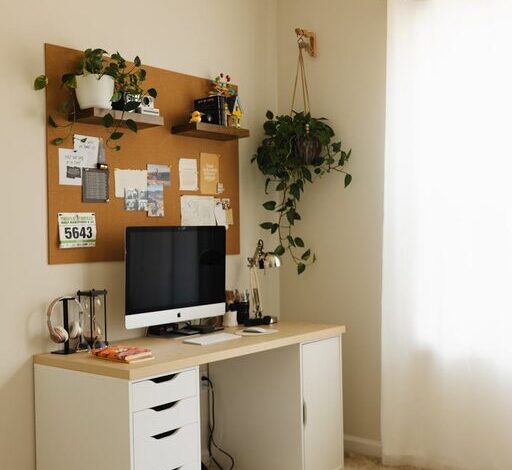
Limit your workspace to items you use daily to reduce distractions. Store or remove non-essential items to maintain a clean surface.
Use Storage Solutions
Drawers, shelves, and organizers can keep paperwork, office supplies, and gadgets orderly and accessible. Consider using labeled bins or trays to categorize items.
Regularly Declutter
Schedule weekly or monthly tidying sessions to clear unnecessary items and maintain your organized setup over time.
Step 4: Optimize Technology Setup
Cable Management
Use cable clips, sleeves, or ties to prevent cords from tangling or cluttering your desk. A neat cable arrangement improves safety and enhances visual appeal.
Efficient Device Placement
Position your computer monitor at eye level to avoid neck strain. Keep your keyboard and mouse at a comfortable height and distance to maintain proper posture.
Backup and Power Solutions
Use surge protectors and backup drives to protect your electronics and files. Ensure you have easy access to outlets for charging devices.
Step 5: Personalize Mindfully
Add Motivating Elements
Incorporate personal touches like inspiring artwork, plants, or photos that bring a positive vibe without overwhelming the space.
Avoid Overcrowding
Decorate with intention, balancing aesthetics with functionality to keep your workspace inviting but focused.
Step 6: Maintain Good Lighting and Air Quality
Layer Lighting
Combine natural light with ambient and task lighting for flexibility during different times of day.
Improve Air Flow
Good ventilation improves concentration and comfort. Open windows when possible or use an air purifier to maintain fresh air.
Step 7: Establish Boundaries and Routines
Define Work Hours
Setting clear start and end times helps maintain work-life balance and signals to others when you’re available.
Use Visual Cues
If sharing your home, use a sign or closed door to indicate when you need uninterrupted work time.
Create a Daily Setup Routine
Start each day by tidying your desk and preparing your workspace, which helps set the tone for a productive day.
Conclusion
By thoughtfully organizing your home workspace, you create an environment that supports focus, reduces stress, and enhances comfort. Simple steps like choosing the right location, investing in ergonomic furniture, managing clutter, and optimizing lighting can have a big impact on your daily productivity. Remember, an effective workspace is one that works for you—tailor these tips to fit your personal needs and preferences. With a little effort and regular upkeep, your home office can become a place where you thrive professionally and feel comfortable all day long.